Create a Reportbook & Add Pages
Create the reportbook shell, add report pages from a workspace, organize the sidebar, and configure global filters for every user.
play_circle Video Walkthrough
Step 1: Create a New Reportbook
- Start from the Start Page, Folders Page, or an existing Reportbook page.
- Click New Report Book.
- Enter a unique name.
- Click Save.
Result: Clarity creates an empty reportbook that is ready for pages.
Step 2: Add Report Pages
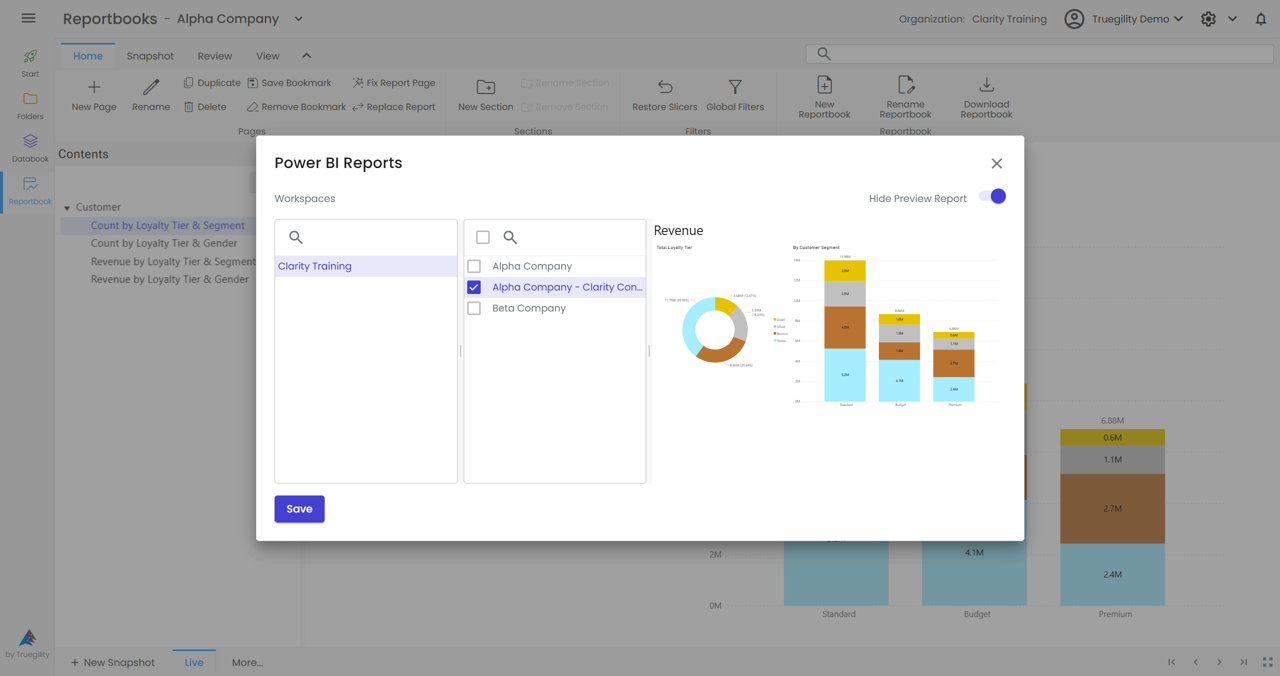
- Click New Page on the Home Ribbon.
- Select the workspace.
- Select the report you want to add.
- Use Show Preview if you want to confirm the report before saving.
Result: Clarity creates a default section and a page named after the selected report.
Step 3: Rename Sections and Pages
Right-click a section or page and give it a descriptive name. Replace defaults such as Default Section with names that explain the content, such as Customer Section or Customer Count by Gender.
Step 4: Clone Report Pages for Efficiency
- Find a page that already has the layout or report context you want.
- Click Duplicate.
- Open the cloned page and adjust the report, title, or saved state.
- Click Save.
This is the fastest way to create related pages without rebuilding every page from scratch.
Step 5: Apply Global Filters
- Click Global Filters on the Home Ribbon.
- Click Add Filter.
- Select the data source, table, and field.
- Pick the values you want and click Apply.
Filters are multi-select by default, so users can choose more than one value at a time.
Step 6: Save and Share Filter Defaults
If you have the right permissions, save the selected filter values as defaults so every user opens the reportbook with the same starting view. To clear saved defaults, clear the filter, apply the empty state, and save again.
Key Takeaways
- Create reportbooks from the Start Page, Folders Page, or an existing reportbook context.
- Preview reports before adding them when you need to confirm the right source.
- Use clear section and page names so the sidebar reads like a curated pack, not a technical dump.
- Duplicate pages to build families of related views quickly.
- Use global filters and saved defaults to keep all users aligned.