Push Updates & Real-Time Sync
Edit master data in Clarity, push the update to linked semantic models, and verify the change in a reportbook without rebuilding the report.
play_circle Video Walkthrough
Step 1: Update Master Data Values
- Open the report and review the current values and legend order.
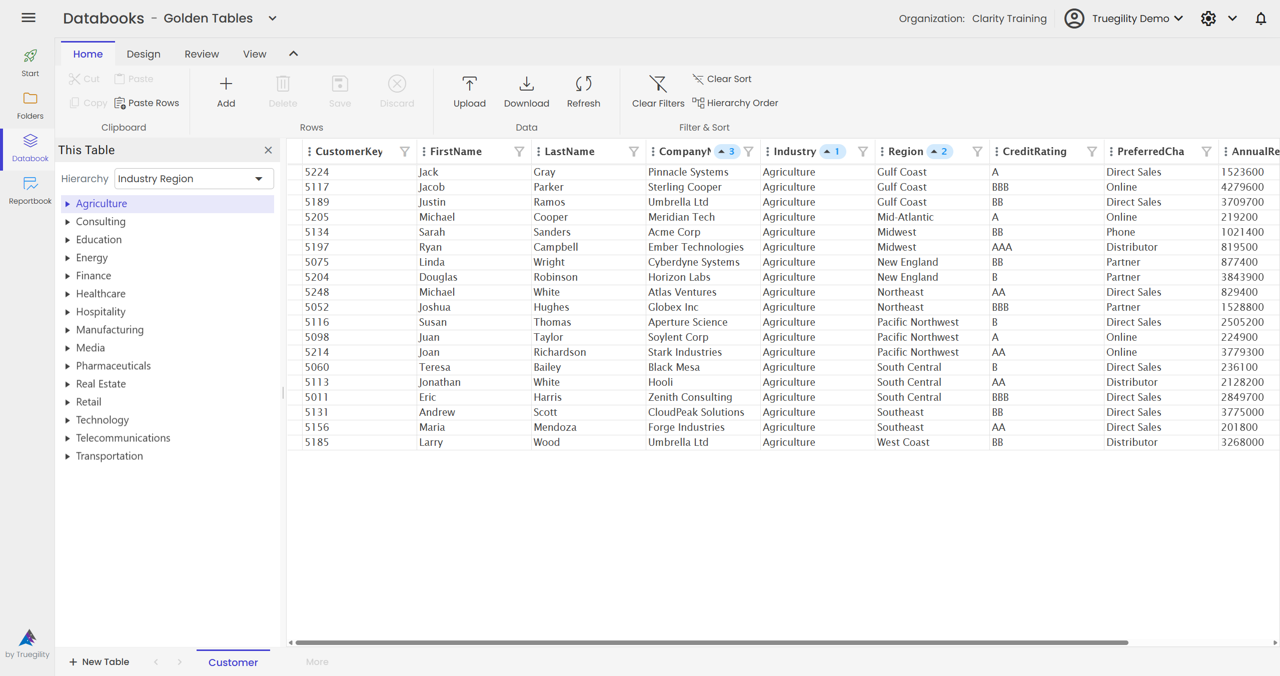
- Go to the master data table in the databook.
- Edit the value directly, such as changing notier to none.
Step 2: Modify Sort Order
- Find the sort order column in the master data table.
- Rearrange the sequence as needed.
- Save the change.
This lets you update both the label and its display order in the same cycle.
Step 3: Push Updates to Semantic Models
- Use the Push button on the Databook Home Ribbon.
- Choose Push all if you want to refresh every linked semantic model at once.
- Wait for the confirmation messages.
During processing, the button disables. Clarity first confirms that the push has started and then follows up with the models and tables that were refreshed.
Key Concept. The flow is Databook to semantic model to reportbook. After the push completes, the reportbook only needs a refresh to show the latest data.
Step 4: Verify the Change in the Reportbook
- Open the reportbook.
- Click Refresh.
- Confirm the updated values and the updated legend order.
Key Takeaways
- Edit master data directly in Clarity instead of making the same change in Power BI.
- Use Push all to refresh all linked semantic models in one action.
- Value changes and order changes move through the same push cycle.
- Reportbooks pick up the change within seconds after the downstream refresh finishes.
- The end-to-end flow is quick enough for day-to-day data stewardship work.
v3.0 | 20260402